Computing Watersheds
Computing watersheds can be a powerful technique for separating the overlapping objects in an image. This technique uses regions of interest or the labels of a multi-ROI as the seed points and an edge enhanced image computed with a Sobel filter as the landscape that corresponds to the objects you want to identify. In the example below, a watershed was computed to segment the grains in a sandpack dataset.
From left to right: original dataset, Sobel version, distance transform map, multi-ROI seeds, computed segmentation

You should note that when you select Compute Watershed, you will be prompted to select an image that will provide the local topography for the watershed algorithm.
You should first complete all of the required pre-processing steps before you attempt to apply a watershed to your data. This can include creating regions of interest or a multi-ROI with the required seed points. Refer to the topics in Pre-Processing Steps for information about these steps.
- Do one of the following:
- Select the regions of interest that will provide the seed points.
- Select the multi-ROI that will provide the seed points.
- Right-click the selected ROIs or multi-ROI and then choose Compute Watershed in the pop-up menu.
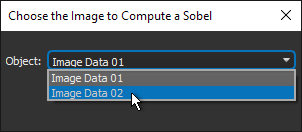
- Choose the dataset that will provide the local topography for the watershed algorithm in the Choose the Image to Compute a Sobel dialog, as shown below.
- Click OK.
The watershed is evaluated with the selected ROIs or with the labeled components in the multi-ROI as the seeds and the computed Sobel image of the selected landscape image.
Wait for the expanded regions of interest or multi-ROI labels to be computed and then overwritten.
